
















Near Vision Charts for the Exam Lane: Jaeger, N-Notation and M-Units at 40 cm
Near vision chart guide for the exam lane: Jaeger vs N-notation vs M-units, why the card's test distance matters, and how to choose a near card or chart.

A near vision chart looks like the simplest instrument in the refraction lane: a card of sentences or letters held at reading distance. In practice it is the chart that causes the most confusion in records, because three different size notations are printed on near cards (Jaeger numbers, printer’s points and M-units) and only one of them is tied to a physical definition. This guide is for ODs, MDs, technicians and practice buyers setting up a lane. It explains what each notation actually measures, why the test distance printed on the card matters, how the card formats differ (pocket card, reading-rod card, back-lit near chart and digital chart), and what to check before you buy. Distance-chart geometry is covered in our separate guide to Snellen chart distance and exam lane setup; this post stays at near.
Shopping for Browse visual acuity charts? US Ophthalmic is a direct provider of Browse visual acuity charts to eye care practices across the US. Tell us how your lane is set up and we will come back with the configurations that fit, plus current availability and lead times.
Why a near chart needs its own notation decision
Visual acuity is a ratio. When Herman Snellen published his letter chart and reading samples in 1862, he defined acuity as the ratio between viewing distance and letter size, and he set a reference letter height that subtends 5 minutes of arc. That definition applies to letter charts and to printed text alike. On a distance chart, the lane length is fixed by the room and the chart is calibrated to it. On a near card, the “lane” is whatever distance the card ends up at in front of the patient, so the size label on the card only means something if the distance is known as well.
That is the whole problem in one sentence: a near result has two halves, the print size and the viewing distance, and most of the confusion comes from cards and records that state only one of them.
The three notations you will see on a near card
Jaeger numbers (J1, J2, J3…)
Jaeger numbers are the most familiar near notation in US practices, and the least defined. In an interview published by Precision Vision, low-vision researcher Dr. August Colenbrander explains their origin: Eduard Jaeger published his print samples in 1854 as an appendix to a book on cataract surgery, printed by the Vienna State Printing House, and the “Jaeger numbers” are simply the reference numbers of the fonts in that printer’s catalogue. They have no numerical value, and Jaeger never defined a preferred reading distance, so a J-number cannot be converted into a visual angle.
The bigger issue for a buyer is copying. Colenbrander reports that when others reproduced Jaeger’s samples with locally available fonts they had to make adjustments, and that on a random sample of 20 cards the print labelled as 1 M varied from J2 to J8. His practical conclusion is that “Jaeger cards” in adjacent exam lanes of the same office may differ in their actual letter sizes. A 2007 ARVO poster by Colenbrander and Runge, titled “Can Jaeger Numbers be Standardized?”, examined the same question. Good-Lite’s charting guide reaches the same working rule: Jaeger labels vary among charts and are not a universally standardized acuity scale, so a Jaeger result is easier to interpret when the chart is identified.
M-units
The M-unit is Snellen’s physical standard with a name attached. Colenbrander notes that Louise Sloan introduced the term in 1952: 1 M-unit is a letter that subtends 5 minutes of arc at 1 meter, which is 1.454 mm. Because it is a physical size, an M-unit label can be checked with a ruler, and the same notation works for letter charts (capital-letter height) and for reading text (lower-case x-height). Precision Vision states that all of its reading cards carry letter size in M-units for this reason.
With M-units the acuity calculation is the Snellen ratio itself: viewing distance in meters divided by the M-size of the smallest line read. Read 0.4 M print at 0.40 m and the ratio is 1.0, the near equivalent of 20/20. Read 1.0 M print at the same 0.40 m and the ratio is 0.4, the equivalent of 20/50.
Printer’s points (N-notation)
N-notation, used widely in Britain, labels reading text by its typeset point size (N5, N6, N8 and so on). It is more consistent than Jaeger because it names a real type size, but Colenbrander points out a limit that matters when you compare cards: printer’s points apply only to printed text, and the same point size looks different in different type fonts. An N-labelled card is therefore reproducible within its own design, but its sizes are not directly interchangeable with a letter chart.
| Notation | What the label refers to | Physical definition | Comparable across cards? |
|---|---|---|---|
| Jaeger (J1, J2…) | Font numbers from an 1854 Vienna print catalogue | None; no defined reading distance | No. Sizes vary by printer (1 M print labelled anywhere from J2 to J8 in one 20-card sample) |
| N (printer’s points) | Typeset point size of the reading text | Type size, which depends on the font | Within one card design; less so across fonts |
| M-units | Letter height that subtends 5 arcmin at 1 m | 1 M = 1.454 mm | Yes, and it can be checked with a ruler |
Many cards print two or three notations side by side. That is useful for staff who learned on Jaeger, as long as the record states which column was read and at what distance.
Test distance: 40 cm, 16 inches and the distance printed on the card
Every near card is calibrated for a stated distance, and the distance varies by product. A few examples from the cards discussed in this post:
- The Good-Lite ICO Near Vision Card (Illinois College of Optometry design) lists a testing distance of 16 in / 40 cm.
- Our Luxvision CP-3000 back-lit near chart lists a test distance of 16 in (400 mm).
- Our Luxvision CP-3003 lists a test distance of 12 in (300 mm).
The distance is not a detail. Because acuity is distance divided by letter size, the same card read 10 cm closer than its calibration gives a better-looking result than the patient’s actual near acuity at the labelled distance. Distance also sets the accommodative demand the card asks for, which is simply the reciprocal of the distance in meters:
| Viewing distance | Accommodative demand | Acuity ratio if the smallest line read is 1.0 M |
|---|---|---|
| 25 cm (about 10 in) | 4.00 D | 0.25 (about 20/80) |
| 30 cm (about 12 in) | 3.33 D | 0.30 (about 20/67) |
| 40 cm (about 16 in) | 2.50 D | 0.40 (20/50) |
| 50 cm (about 20 in) | 2.00 D | 0.50 (20/40) |
Two equipment details follow from this. First, keep the distance physically controlled. Precision Vision ships its reading tests with a 40 cm cord attached so they are used at the labelled distance, and notes that cards intended for closer working distances come with a calibrated ruler instead. On a refraction lane, the phoropter’s reading rod does the same job. Second, if a lane uses two near charts with different calibration distances (say a 16 in card on the rod and a 12 in back-lit chart on the desk), label which is which so a technician does not hold one at the other’s distance.
Card formats: pocket, reading rod, back-lit and digital
Hand-held pocket cards
The cheapest and most portable option, and the format behind searches such as “near point card” and “Rosenbaum card”. Pocket cards suit screenings, bedside checks and satellite rooms. Their weakness is distance control: unless a cord or ruler comes with the card, the distance is whatever the patient’s arm chooses. Buy them in the notation your practice records and replace worn or yellowed cards, since print contrast is part of what the card measures.
Reading-rod cards on the phoropter
The reading rod clips to the refractor and carries a near card at a measured distance, usually with inch, centimeter and diopter scales. This is the most repeatable way to run a near test during refraction because the distance is set by the rod, not by the patient. Rod length and the number of tests on the bundled near card vary by model, so compare them when you choose a refractor. Our manual phoropter guide covers the near-point rod among the accessories worth checking, and our step-by-step phoropter walkthrough shows where the near setup sits in the exam sequence.
Back-lit (LED) near charts
A back-lit near chart puts the test card in front of an LED panel so the luminance on the card does not depend on the room lights or on where the patient sits. That is the main argument for this format: near acuity read on a dim corner of the lane is not the same test as near acuity read on an evenly lit card. Back-lit charts also stand on a desk or hang on a wall, which makes them a good fit for a dispensing or contact-lens area where no phoropter is present.
Digital acuity charts
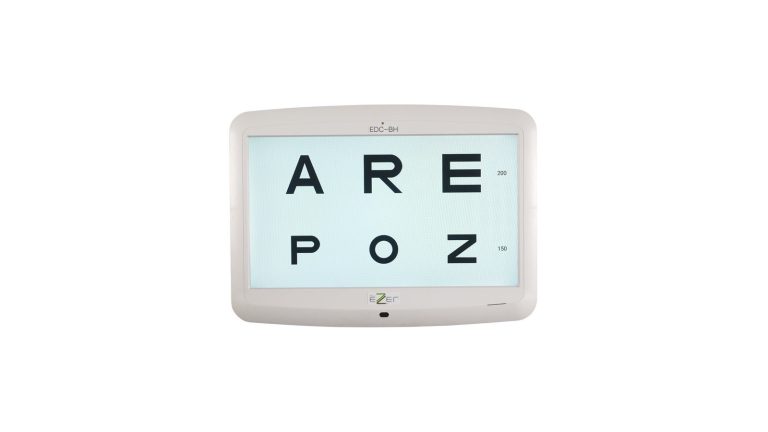
Digital LCD charts are built for distance testing. Our Ezer EDC-BH, for example, is a 23-inch Full-HD system with a programmable test distance of 1.0 to 6.0 m in 0.1 m steps. A digital distance chart does not replace a near card; most lanes keep both. If you are equipping a full lane, read our digital acuity chart comparison for the distance side and our overview of eye chart types (printed, projector and digital) for how the formats compare.
| Format | Distance control | Lighting control | Best fit |
|---|---|---|---|
| Pocket card | Only with a cord or ruler | Room light | Screenings, satellite rooms, bedside |
| Reading-rod card | Set by the rod scale | Room or lane light | Refraction lanes with a phoropter |
| Back-lit near chart | Labelled distance; use a tape or rod | Built-in LED panel | Lanes, dispensing and contact-lens areas |
| Digital LCD chart | Programmed for distance testing | Display luminance | Distance acuity; pair with a near card |
Near charts we supply: Luxvision CP-3000 and CP-3003
Our visual acuity collection carries two back-lit near charts from Luxvision. Both use rear LED lighting for uniform illumination across the card, both can stand on a table or mount on a wall, and both ship with the chart, a USB cable, a power adapter, a pointer and operating instructions. The practical difference is the calibration distance.
| Specification | Luxvision CP-3000 | Luxvision CP-3003 |
|---|---|---|
| Test distance | 16 in (400 mm) | 12 in (300 mm) |
| Dimensions | 7.68 × 5.75 × 0.43 in (195 × 146 × 11 mm) | 7.67 × 5.75 × 0.43 in (195 × 146 × 11 mm) |
| Power supply | AAA battery, computer (USB cable) or AC power | AAA battery, computer (USB cable) or AC power |
| Power adapter | Input AC 100–240 V, output 5 V 800 mA | Input AC 100 or 240 V, output 5 V 800 mA |
| Mounting | Table or wall | Table or wall |
Pick the CP-3000 if your lane protocol and records are built around a 40 cm / 16 in near test, which matches most reading-rod cards. Pick the CP-3003 if you want a chart calibrated for a 12 in working distance. Battery power means either one can be moved between rooms without a nearby outlet. Every unit we supply is new, with US warranty and support from our in-house technical and spare-parts team.
Recording near acuity so the next exam can compare
The cheapest improvement to near testing is in the chart note, not the chart. Good-Lite’s charting guidance is that a near acuity entry should include the notation system, the actual viewing distance and the correction used, for example “Near VA OD cc N6 at 40 cm; OS cc N6 at 40 cm”. It adds that M notation paired with a measured viewing distance supports more reproducible interpretation than an unqualified Jaeger label, and that distance and near findings should be recorded separately. If you keep Jaeger cards, write down which card was used so that a later exam on a different card is not misread as a change.
How to choose a near vision chart: a checklist
- Notation. Prefer a card that prints M-units (alone or alongside Jaeger or N) so results are tied to a physical letter size.
- Stated test distance. Confirm the calibration distance printed on the card or spec sheet (40 cm / 16 in, 30 cm / 12 in, or other) and match it to your lane protocol.
- Distance control. Plan how the distance will be held: reading rod, cord, ruler, or a marked spot for a desk chart.
- Lighting. If near tests happen in rooms with uneven light, a back-lit chart removes one variable.
- Content. Continuous text, single letters or symbols; pick what matches who you test (adults reading, children, non-readers).
- Durability and power. Laminated or panel-mounted cards last longer than paper; check battery, USB and AC options for charts that move between rooms.
- Consistency across lanes. Use the same card design in every lane so a result in lane 1 means the same thing in lane 3.
- Service and spares. Ask who replaces worn cards, rods and pointers. We source near cards and reading rods for the refractors we supply.
Need a near chart for one lane or matched charts for a whole practice? REQUEST QUOTE and tell us your lane layout and the test distance your team uses.
Ready to spec your Browse visual acuity charts?
Send us your requirements and our equipment specialists will come back with a configuration built around how your practice actually works — including availability and lead time. US Ophthalmic is a direct provider to eye care practices nationwide.
Frequently asked questions
What is a near vision chart?
A near vision chart is a card or back-lit panel of text, letters or symbols in graded sizes, calibrated to be read at a stated near distance (often 40 cm / 16 in). The smallest line read at that distance gives the near acuity result.
What distance should a near vision chart be held at?
At the distance printed on that card. Many cards are calibrated for 40 cm / 16 in, but some are not; our Luxvision CP-3003, for example, is specified for 12 in (300 mm). Holding a card closer than its calibration makes the result look better than it is.
What does J1 mean on a Jaeger chart?
J-numbers come from the font catalogue of the Vienna printing house that produced Jaeger’s 1854 samples. They have no numerical value and no defined reading distance, and copies differ: one 20-card sample showed 1 M print labelled anywhere from J2 to J8. Read a J-number as specific to the card it was read on.
What is an M-unit on a near card?
An M-unit is a letter size that subtends 5 minutes of arc at 1 meter, which is 1.454 mm. Divide the viewing distance in meters by the M-size read to get the acuity ratio; 0.4 M read at 0.40 m equals 1.0, the near equivalent of 20/20.
Can Jaeger results from different cards be compared?
Not reliably. Because printers reproduced Jaeger’s samples with different fonts, the same J-number can be a different letter size on another card. Record the card used, or move to M-unit cards for comparisons over time.
Should I buy a new or refurbished near vision chart?
US Ophthalmic supplies new near charts only, not refurbished ones, with US warranty and in-house support. If budget is the concern, ask us about open-box units, which are inspected and function-checked demo, display or overstock stock.
Sources consulted for this guide: Precision Vision, “The Jaeger Notation Debate” (interview with Dr. August Colenbrander); Colenbrander & Runge, “Can Jaeger Numbers be Standardized?”, ARVO 2007 poster 3563; Good-Lite, “Eye Exam Charting: How to Record Visual Acuity Results Correctly” and the Good-Lite ICO Near Vision Card product page; US Ophthalmic product specifications for the Luxvision CP-3000, CP-3003 and Ezer EDC-BH.