DICOM Compatibility for Efficient Data Management
DICOM support facilitates the seamless upload and download of patient information for efficient data management.
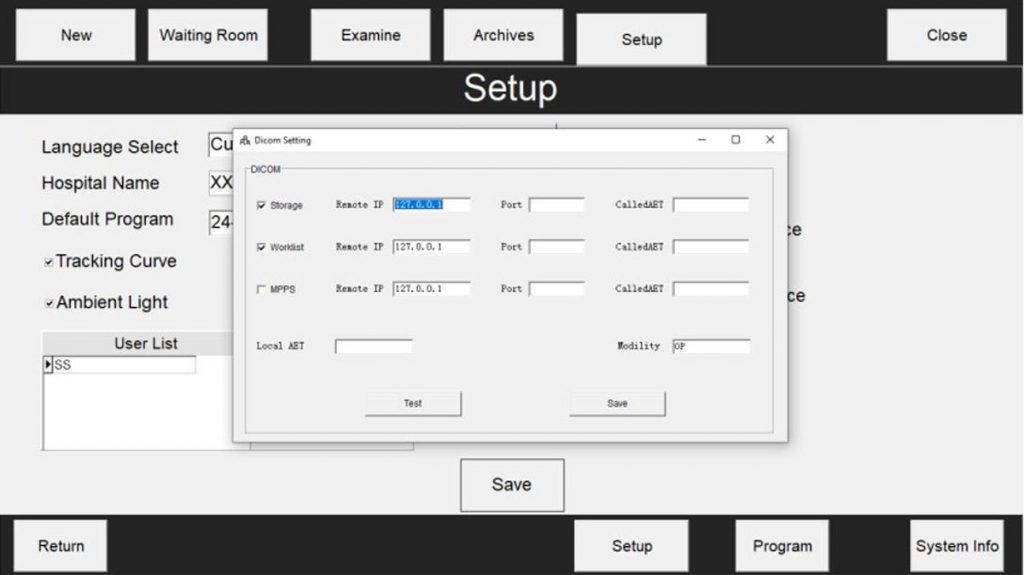
Storage
The device converts images into DICOM format, communicates via the DICOM protocol, and transmits files to the PACS server. Once the examination is complete, the system automatically uploads the images through the hospital network. (Required)
Worklist
Allows retrieval of the patient information table. The advantage is that it avoids repetitive entry of basic data and reduces input errors. If this function is not available, the operator will need to manually re-enter the data into the device after registration in the RIS.(Optional / Not mandatory)
MPPS
During the examination process, the system notifies the PACS server of the current status of the patient’s test. There are three inspection states:<
- In progress
- Completed
- Image transmission completed
Remote IP
Hospital internal network
Called AET
Hospital network AE Title
Modality
Device type
IP Address / Port
Hospital internal network port
Local AET
Device local AE Title